Ilearned something new from my colleague Koen Van Hauwenhuyse. He showed me 2 extra querystring parameters you can add tot the portal URL so the content will be shown different.
The normal Url of the page: http://***/TSTReplacement.aspx?WCMP=TST
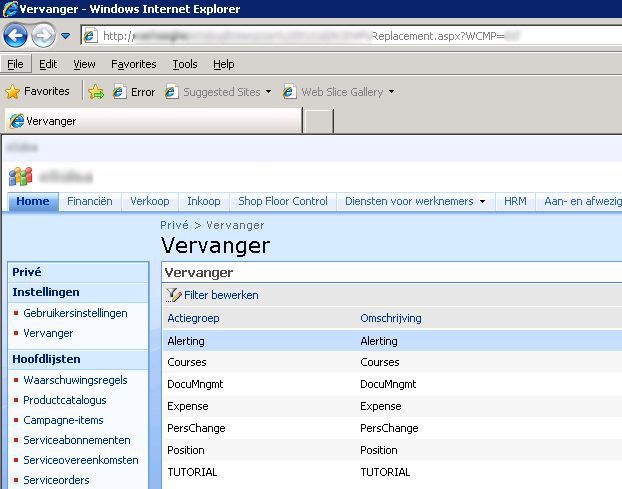
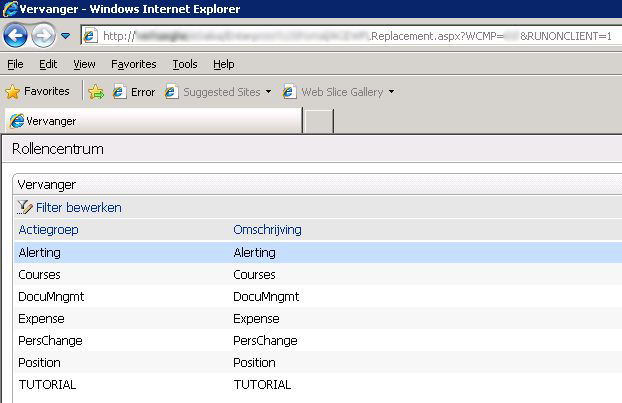
The Url for the rolecenter-view of the same page: http://***/TSTReplacement.aspx?WCMP=TST&RUNONCLIENT=1
The Url for the same page without any navigation: http://***/TSTReplacement.aspx?WCMP=TST&NONAV=1

You can find the logic behind this in the masterpage that Sharepoint is using. The masterpages can be found under C:Program FilesCommon FilesMicrosoft Sharedweb server extensions12TEMPLATEFEATURESDynamicsAxEnterprisePortaldefaultax.master.

In the beginning of this file you see the methods runningOnClient() and hideNavigation():
1 2 3 4 5 6 7 8 9 10 11 12 13 14 15 16 17 18 19 20 21 22 23 24 25 26 27 28 29 30 31 32 33 34 35 36 37 38 39 40 41 42 43 44 45 46 47 | <%@Master language="C#"%> <%@ Register Tagprefix="SharePoint" Namespace="Microsoft.SharePoint.WebControls" Assembly="Microsoft.SharePoint, Version=12.0.0.0, Culture=neutral, PublicKeyToken=71e9bce111e9429c" %> <%@ Register Tagprefix="Utilities" Namespace="Microsoft.SharePoint.Utilities" Assembly="Microsoft.SharePoint, Version=12.0.0.0, Culture=neutral, PublicKeyToken=71e9bce111e9429c" %> <%@ Import Namespace="Microsoft.SharePoint" %> <%@ Import Namespace="Microsoft.SharePoint.ApplicationPages" %> <%@ Register Tagprefix="WebPartPages" Namespace="Microsoft.SharePoint.WebPartPages" Assembly="Microsoft.SharePoint, Version=12.0.0.0, Culture=neutral, PublicKeyToken=71e9bce111e9429c" %> <%@ Register TagPrefix="wssuc" TagName="Welcome" src="~/_controltemplates/Welcome.ascx" %> <%@ Register TagPrefix="wssuc" TagName="DesignModeConsole" src="~/_controltemplates/DesignModeConsole.ascx" %> <%@ Register Tagprefix="Dynamics" Namespace="Microsoft.Dynamics.Framework.Portal.UI.WebControls" Assembly="Microsoft.Dynamics.Framework.Portal, Version=5.0.0.0, Culture=neutral, PublicKeyToken=31bf3856ad364e35" %> <%@ Register Assembly="System.Web.Extensions, Version=3.5.0.0, Culture=neutral, PublicKeyToken=31bf3856ad364e35" Namespace="System.Web.UI" TagPrefix="asp" %> <%@ Assembly Name="Microsoft.Dynamics.Framework.BusinessConnector, Version=5.0.0.0, Culture=neutral, PublicKeyToken=31bf3856ad364e35, Custom=null" %> <%@ Import Namespace="Microsoft.Dynamics.Framework.Portal" %> <%@ Import Namespace="Microsoft.Dynamics.Framework.Portal.UI" %> <%@ Import Namespace="Microsoft.Dynamics.Framework.BusinessConnector.Session" %> <script runat="server"> bool runningOnClient() { return (Context.Request.Params.Get("RUNONCLIENT") == "1"); } bool hideNavigation() { return (Context.Request.Params.Get("NONAV") == "1"); } string getStyleRunOnClientDisplayStyle() { if (runningOnClient()) return ""; return "display:none;"; } string getStyleRunOnBrowserDisplayStyle() { if (runningOnClient() || hideNavigation()) return "display:none;"; return ""; } string getStyleRunOnBrowserBorderStyle() { if (runningOnClient() || hideNavigation()) return "border-style:none;"; return ""; } ... |

